build ros2 on raspi5
地窖上的松 Lv1

对 ros 一知半解,但是按着 debian 部署教程试了试。

前言

ros2 官方文档写着,树莓派所使用的芯片是arm64的,可以得到第一层支持,最方便的方法是安装 ubuntu 系统或者使用 docker。

ROS 2 is supported on both 32 bit (arm32) and 64 bit (arm64) ARM processors. However, you can see here that arm64 receives Tier 1 support, while arm32 is Tier 3. Tier 1 support means distribution specific packages and binary archives are available, while Tier 3 requires the user to compile ROS 2 from source.

项目已经决定使用 raspberrypi 系统,且担心使用 docker 运行的稳定性,所以采用源码编译的方式。
此库是 ros 在 debian 上的补丁,可以按着其中的bookworm补丁来编译rolling版本的ros2

这个库也许能算是官方的补丁?不知道为啥没有 star 和 fork


模仿原库的写法改了个 jazzy 版本的,部署编译不会再碰到rolling版本的这么多问题。

下载补丁库

1
git clone https://github.com/RustRobotics/ros2-debian.git

打开 bookworm/readme.md,后面就是按着里面的步骤走,不过后面的指令都要在ros2-debian根目录执行。

安装前置依赖

执行make -f bookworm/Makefile all实际上就是执行bookworm/Makefile中的命令,不知道为啥不能够自己进入虚拟环境,所以最好打开文件,一步步复制指令执行。

创建虚拟环境

并激活。

1
2
python3 -m venv venv
source venv/bin/activate

安装 python 库

1
2
3
4
5
6
7
8
9
10
11
12
13
14
15
16
17
pip3 install --upgrade \
catkin-pkg \
colcon-common-extensions \
flake8-blind-except \
flake8-builtins \
flake8-class-newline \
flake8-comprehensions \
flake8-deprecated \
flake8-import-order \
flake8-quotes \
rosdep \
rosdistro \
rospkg \
vcstool \
pytest-repeat \
lark \
opencv-python

apt 安装依赖

这些是基础中的基础:

1
2
3
4
5
6
7
8
9
10
11
12
13
14
15
16
17
18
sudo apt install -y \
build-essential \
cmake \
flake8 \
git \
python3-catkin \
python3-catkin-pkg \
python3-flake8 \
python3-flake8-docstrings \
python3-flake8-polyfill \
python3-pip \
python3-pytest \
python3-pytest-cov \
python3-pytest-flake8 \
python3-pytest-rerunfailures \
python3-setuptools \
python3-venv \
wget

这些就是依赖库了:

1
2
3
4
5
6
7
8
9
10
11
12
13
14
15
16
17
18
19
20
21
22
23
24
25
26
27
sudo apt install -y \
bison \
curl \
libacl1-dev \
libasio-dev \
libbullet-dev \
libeigen3-dev \
libfastcdr-dev \
libfoonathan-memory-dev \
libfreetype-dev \
liblttng-ctl-dev \
liblttng-ust-dev \
liblog4cxx-dev \
libopencv-dev \
libtinyxml2-dev \
libxaw7-dev \
libxrandr-dev \
pyqt5-dev \
pyqt5-dev-tools \
python3-lark \
python3-opencv \
python3-sip-dev \
qtbase5-dev \
qtbase5-dev-tools \
qttools5-dev \
qttools5-dev-tools \
sip-dev

Makeflie最后还有几行:setup-pip: mkdir ~/.pip install -v -m644 pip.conf ~/.pip/pip.conf,作用不明

安装 pyqt5

1
pip install pyqt5

卡在preparing metadata

尝试使用下面的指令安装:

1
pip install pyqt5 --config-settings --confirm-license= --verbose

然后又卡在 Compiling the project...

采用源码编译参考博客

下载链接:sip-4.19.25PyQT5-5.15.2

编译 sip

解压,cd 到 sip 目录,配置

1
sudo python configure.py --sip-module PyQt5.sip

编译

1
sudo make -j4
  • error: invalid use of undefined type 'struct _frame'

貌似是版本问题。

解决方法:手动打开报错中写的sip-4.19.25/siplib/siplib.c文件,将第 13750 行替换成frame = PyFrame_GetBack(frame);

参考链接


安装

1
sudo make install

编译 PyQT5

配置

1
sudo python configure.py

然后输入yes同意协议

编译安装

1
2
sudo make -j4
sudo make install

这样会把sipPyQT5安装在基本环境,/usr/lib/python3/dist-packages下,在虚拟环境下使用需要自己复制到虚拟环境目录。

1
2
3
cd /usr/lib/python3/dist-packages
sudo cp -r ./PyQt5 sipconfig.py /home/raspi/ros/ros2-debian/venv/lib/python3.11/site-packages

下载源码

1
2
mkdir src
vcs import src < ros2.repos

打补丁

1
2
3
pushd bookworm/patches
make
popd

意思是先进入到bookworm/patches路径,执行Makefile然后返回到根目录。
可以直接执行这条指令,也可以打开Makefile按着一步步来。
Makefile的内容是:

1
2
cd ../../src/eProsima/Fast-DDS
git apply (刚才的补丁路径)/fastrtps-stdint.patch || true

这里其实就是往src/eProsima/Fast-DDS/src/cpp/statistics/types/monitorservice_typesv1.cxxtypesv1.cxx的第 39 行加上一句:#include <cstdint>

  • 重复执行会导致patch does not apply报错,因为这一行已经加上去了,补丁找不到没加上去时需要匹配的段落,所以不用管。

后面的|| true意义不明。

1
2
cd ../../build/rviz_assimp_vendor/assimp_vendor-prefix/src/assimp_vendor
git apply $(PATCHES)/assimp-compare-array.patch || true
  • 这里在一开始执行就会有报错,因为补丁要修改的是ros2-debian/build文件夹中的内容,而这个文件夹会在编译时创建。
    正如readme.md中说的,如果编译有报错再重新执行补丁。

编译

记得进虚拟环境:

1
source venv/bin/activate

在根目录执行编译:

1
colcon build --symlink-install

  • 找不到catkin_pkg
1
2
3
4
5
6
7
8
9
10
11
--- stderr: ament_cmake_core
Traceback (most recent call last):
File "/home/raspi/ros/ros2-debian/src/ament/ament_cmake/ament_cmake_core/cmake/core/package_xml_2_cmake.py", line 22, in <module>
from catkin_pkg.package import parse_package_string
ModuleNotFoundError: No module named 'catkin_pkg'
CMake Error at cmake/core/ament_package_xml.cmake:95 (message):
execute_process(/usr/local/bin/python3.10
/home/raspi/ros/ros2-debian/src/ament/ament_cmake/ament_cmake_core/cmake/core/package_xml_2_cmake.py
/home/raspi/ros/ros2-debian/src/ament/ament_cmake/ament_cmake_core/package.xml
/home/raspi/ros/ros2-debian/build/ament_cmake_core/ament_cmake_core/package.cmake)
returned error code 1

需要检查是否安装catkin-pkg,没有就 pip install catkin-pkg,有的话可以cd/ && find . -name catkin_pkg找找装哪了。
另外就是看看报错信息,用的系统上的哪个 python,像上面这段写的就是用的python3.10,对比一下catkin_pkg装在了哪个 python 环境中。


  • fastcdr版本不匹配
1
2
3
4
5
6
7
8
9
10
11
12
13
14
--- stderr: rosidl_typesupport_fastrtps_cpp
CMake Error at CMakeLists.txt:26 (find_package):
Could not find a configuration file for package "fastcdr" that is
compatible with requested version "2".

The following configuration files were considered but not accepted:

/home/raspi/ros/ros2-debian/install/fastcdr/lib/cmake/fastcdr/fastcdr-config.cmake, version: 1.1.1
/usr/lib/aarch64-linux-gnu/cmake/fastcdr/fastcdr-config.cmake, version: 1.0.26
/lib/aarch64-linux-gnu/cmake/fastcdr/fastcdr-config.cmake, version: 1.0.26


gmake: *** [Makefile:487: cmake_check_build_system] Error 1

如报错所说,编译需要版本为 2 以上,但是源码中只提供了 1.1.1 版本。
报错所写的路径install/fastcdr/lib/cmake/fastcdr/fastcdr-config.cmake是源码编译后安装在其中的,其中就包括了编译好的三方库fastcdr,对应的源码路径应该在src/eProsima/Fast-CDR
解决方法是去下载高版本的fastcdr,替换掉里面的源码,我用的是2.1.3,下载地址在这
下载,解压,把源码替换掉就好,编译时会自动编译2.1.3版本的fastcdr并安装在install/fastcdr/lib/cmake/fastcdr路径下。


  • Cython相关
1
2
3
4
5
6
7
8
9
10
11
12
13
14
15
16
17
18
19
20
21
22
23
24
25
26
27
28
29
30
31
32
33
34
[2.499s] ERROR:colcon.colcon_core.package_identification:Exception in package identification extension 'python_setup_py' in 'venv/lib/python3.11/site-packages/numpy/_core/tests/examples/cython': invalid syntax (<unknown>, line 1)
Traceback (most recent call last):
File "/home/raspi/ros/ros2-debian/venv/lib/python3.11/site-packages/colcon_core/package_identification/__init__.py", line 144, in _identify
retval = extension.identify(_reused_descriptor_instance)
^^^^^^^^^^^^^^^^^^^^^^^^^^^^^^^^^^^^^^^^^^^^^^^
File "/home/raspi/ros/ros2-debian/venv/lib/python3.11/site-packages/colcon_python_setup_py/package_identification/python_setup_py.py", line 48, in identify
config = get_setup_information(setup_py)
^^^^^^^^^^^^^^^^^^^^^^^^^^^^^^^
File "/home/raspi/ros/ros2-debian/venv/lib/python3.11/site-packages/colcon_python_setup_py/package_identification/python_setup_py.py", line 249, in get_setup_information
_setup_information_cache[hashable_env] = _get_setup_information(
^^^^^^^^^^^^^^^^^^^^^^^
File "/home/raspi/ros/ros2-debian/venv/lib/python3.11/site-packages/colcon_python_setup_py/package_identification/python_setup_py.py", line 301, in _get_setup_information
return ast.literal_eval(output)
^^^^^^^^^^^^^^^^^^^^^^^^
File "/usr/lib/python3.11/ast.py", line 64, in literal_eval
node_or_string = parse(node_or_string.lstrip(" \t"), mode='eval')
^^^^^^^^^^^^^^^^^^^^^^^^^^^^^^^^^^^^^^^^^^^^^^^^
File "/usr/lib/python3.11/ast.py", line 50, in parse
return compile(source, filename, mode, flags,
^^^^^^^^^^^^^^^^^^^^^^^^^^^^^^^^^^^^^^
File "<unknown>", line 1
Compiling ./checks.pyx because it changed.
^
SyntaxError: invalid syntax

[2.890s] ERROR:colcon.colcon_core.package_identification:Failed to determine Python package name in 'venv/lib/python3.11/site-packages/numpy/_core/tests/examples/limited_api'
[2.891s] ERROR:colcon.colcon_core.package_identification:Exception in package identification extension 'python_setup_py' in 'venv/lib/python3.11/site-packages/numpy/_core/tests/examples/limited_api': Failed to determine Python package name in 'venv/lib/python3.11/site-packages/numpy/_core/tests/examples/limited_api'
Traceback (most recent call last):
File "/home/raspi/ros/ros2-debian/venv/lib/python3.11/site-packages/colcon_core/package_identification/__init__.py", line 144, in _identify
retval = extension.identify(_reused_descriptor_instance)
^^^^^^^^^^^^^^^^^^^^^^^^^^^^^^^^^^^^^^^^^^^^^^^
File "/home/raspi/ros/ros2-debian/venv/lib/python3.11/site-packages/colcon_python_setup_py/package_identification/python_setup_py.py", line 57, in identify
raise RuntimeError(
RuntimeError: Failed to determine Python package name in 'venv/lib/python3.11/site-packages/numpy/_core/tests/examples/limited_api'

尚未解决,因为不会强制停止编译进程所以先挂起(


  • 找不到pyqt5
1
2
3
4
5
6
7
8
9
10
11
12
Starting >>> qt_gui_cpp
[Processing: qt_gui_cpp, rclcpp, rclpy, rviz_rendering]
--- stderr: qt_gui_cpp
Traceback (most recent call last):
File "/home/raspi/ros/ros2-debian/install/python_qt_binding/share/python_qt_binding/cmake/sip_configure.py", line 9, in <module>
import PyQt5
ModuleNotFoundError: No module named 'PyQt5'
gmake[2]: *** [src/qt_gui_cpp_sip/CMakeFiles/libqt_gui_cpp_sip.dir/build.make:103: sip/qt_gui_cpp_sip/Makefile] Error 1
gmake[1]: *** [CMakeFiles/Makefile2:253: src/qt_gui_cpp_sip/CMakeFiles/libqt_gui_cpp_sip.dir/all] Error 2
gmake: *** [Makefile:146: all] Error 2
---
Failed <<< qt_gui_cpp [53.7s, exited with code 2]

解决方法:从源码编译sipPyQT5


  • 找不到gz_math_vendor
1
2
3
4
5
6
7
8
9
10
11
12
13
14
15
16
--- stderr: rviz_default_plugins
CMake Error at CMakeLists.txt:64 (find_package):
By not providing "Findgz_math_vendor.cmake" in CMAKE_MODULE_PATH this
project has asked CMake to find a package configuration file provided by
"gz_math_vendor", but CMake did not find one.

Could not find a package configuration file provided by "gz_math_vendor"
with any of the following names:

gz_math_vendorConfig.cmake
gz_math_vendor-config.cmake

Add the installation prefix of "gz_math_vendor" to CMAKE_PREFIX_PATH or set
"gz_math_vendor_DIR" to a directory containing one of the above files. If
"gz_math_vendor" provides a separate development package or SDK, be sure it
has been installed.

也不知怎么的就是缺库了,需要往src/gazebo-release里面添加三个库:gz_math_vendor, gz_cmake_vendor, gz_utils_vendor

1
2
3
git clone https://github.com/gazebo-release/gz_math_vendor.git
git clone https://github.com/gazebo-release/gz_cmake_vendor.git
git clone https://github.com/gazebo-release/gz_utils_vendor.git

rviz_default_plugins需要 gz_math_vendor, gz_math_vendor需要 gz_cmake_vendor, gz_cmake_vendor又需要 gz_utils_vendor, 属于是包体蜈蚣了


  • 找不到 point_cloud_transport
1
2
3
4
5
6
7
8
9
10
11
12
13
14
15
16
17
18
--- stderr: rviz_default_plugins
CMake Error at CMakeLists.txt:73 (find_package):
By not providing "Findpoint_cloud_transport.cmake" in CMAKE_MODULE_PATH
this project has asked CMake to find a package configuration file provided
by "point_cloud_transport", but CMake did not find one.

Could not find a package configuration file provided by
"point_cloud_transport" with any of the following names:

point_cloud_transportConfig.cmake
point_cloud_transport-config.cmake

Add the installation prefix of "point_cloud_transport" to CMAKE_PREFIX_PATH
or set "point_cloud_transport_DIR" to a directory containing one of the
above files. If "point_cloud_transport" provides a separate development
package or SDK, be sure it has been installed.


看得出来,ros2/rviz这个包就喜欢缺库

src/ros-perception 里添加上此库。

1
git clone https://github.com/ros-perception/point_cloud_transport.git

安装

添加环境设置以省略ros2的启用

1
sudo vim ~/.bashrc

在最后加上一行 source /path-to-ros2-debian/install/setup.bash,在我的机器上是

1
source /home/raspi/ros/ros2-debian/install/setup.bash

setup.bashlocal_setup.bash的区别

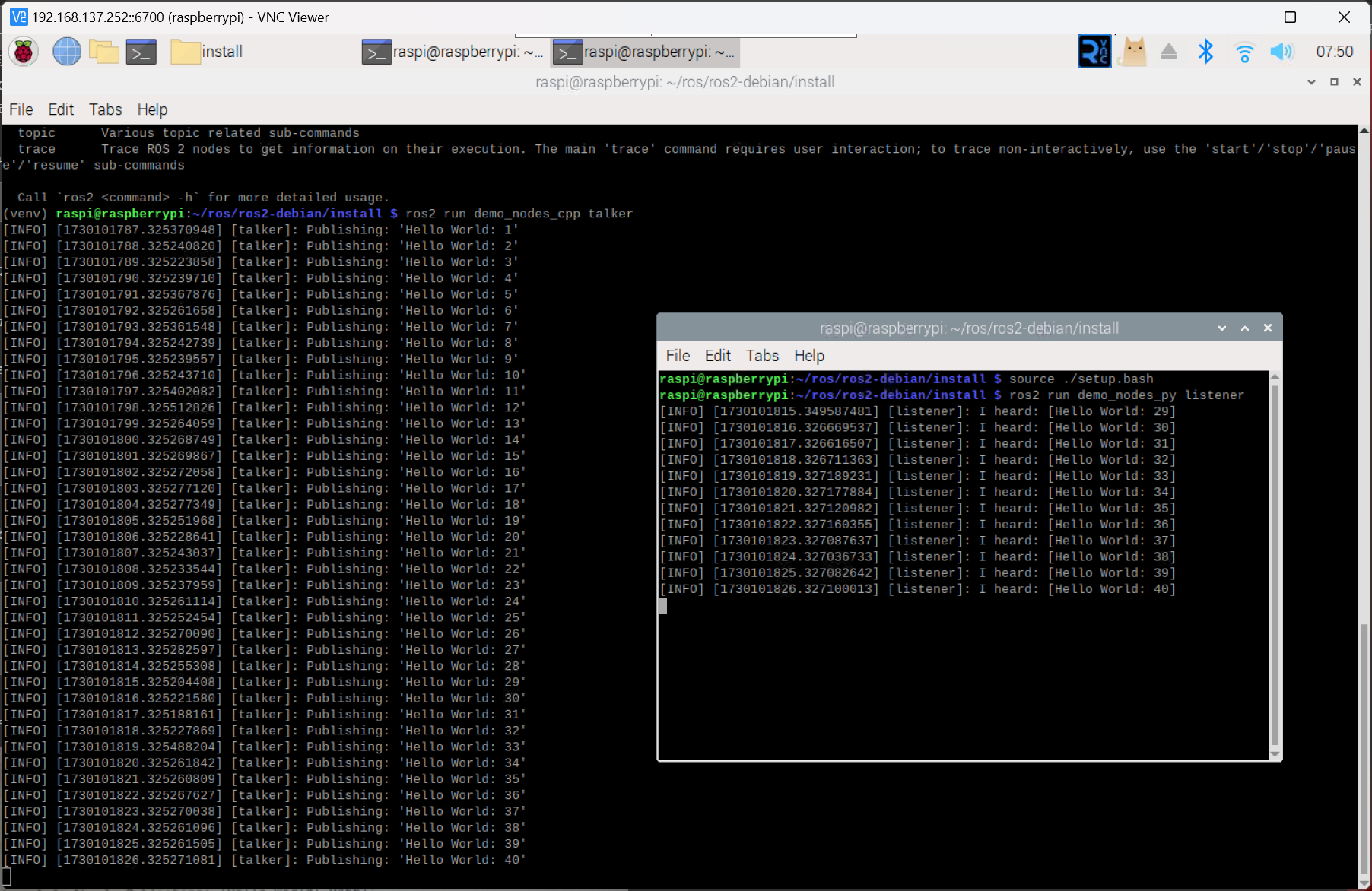
运行 demo

打开两个终端,分别运行:

1
ros2 run demo_nodes_cpp talker
1
ros2 run demo_nodes_py listener

image